
OnlyFans Ranking Cards: What the Numbers Mean
OnlyFans ranking cards are compact summary panels that list public profile prices, promotions, activity levels and media counts. They exist because the platform itself has no built-in discovery feed or directory. Readers use these cards to compare pages quickly, but the numbers need careful interpretation. This article explains what each field means and where the data can mislead.

A ranking card is not a review and not an endorsement. It is a structured snapshot built from information anyone can see on a public profile. The value comes from comparing many pages on the same terms. The risk comes from treating one number as a final verdict.
Below, each section breaks down one part of a typical ranking entry. The goal is simple: read the card correctly, then verify anything that matters on the live page.
Anatomy of a ranking card
A standard entry usually opens with the page name, a rank position and a price field. Next come activity markers such as post frequency, last update time and media counts. Some cards also flag whether a promotion is active.
Rank position is relative, not absolute. It reflects how one page compares with others in the same index at a given moment. Price is the listed subscription cost before checkout. Activity markers show how recently the page changed.
Media counts describe the size of the public library. A high count does not guarantee frequent new posts. A low count does not mean the page is inactive.
- Assuming rank position measures quality rather than relative placement in one index.
- Treating the listed price as the final amount paid at checkout.
- Reading media counts as a measure of recent activity.
- Ignoring the timestamp that shows when card data was last refreshed.
- Confusing a promotional first-month price with the standard subscription rate.
Each of these mistakes comes from reading one field in isolation. A card works best when its fields are read together. That is also why a comparison service such as BestOnlyFans presents several columns side by side instead of a single score.

Rank position table
Rank position is the field readers notice first. It summarizes relative standing within one index. The table below shows what different bands usually reflect.
| Rank band | What it usually reflects |
| High position | Strong recent activity, consistent updates and a public profile that compares well on the tracked fields. |
| Mid position | Steady activity with fewer updates or a smaller public media library than pages above it. |
| Low position | Sparse updates, a newer page, or a profile that has changed little since the last refresh. |
A high position is not a rating of content. It is a summary of tracked public signals. A low position may simply mean the page was indexed recently or has not posted since the last crawl.

The price column
Paid subscriptions run from a minimum of $4.99 to a maximum of $49.99. Most paid pages sit between $4.99 and $15, with many averaging $5 to $10. There is no base price below $4.99; only promotional first months may dip under that floor.
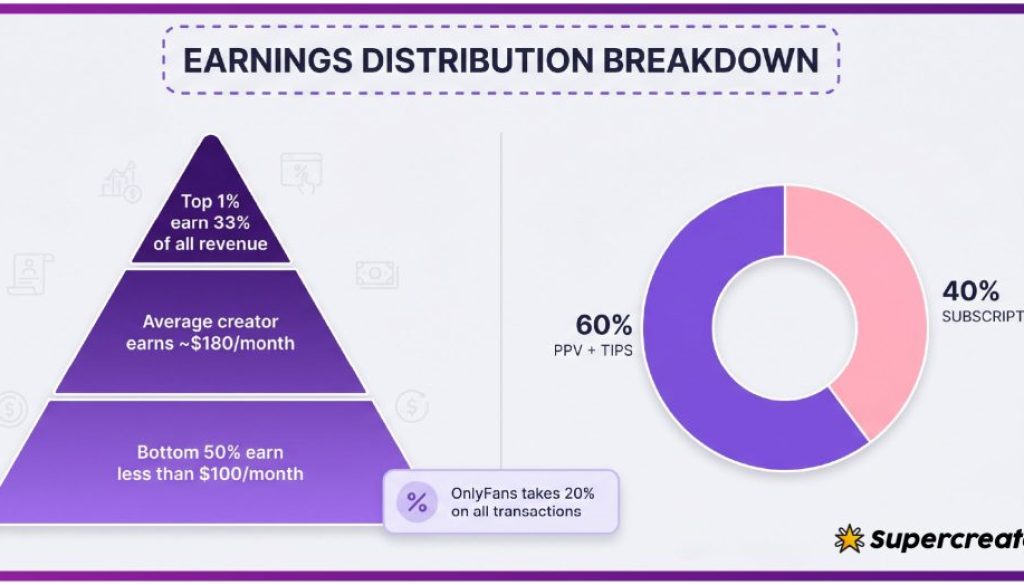
Free pages are price set to $0. These pages earn through pay-per-view messages and tips rather than a monthly charge. The platform fee is 20% on everything, including subscriptions, tips and pay-per-view, so the creator keeps 80%.
Checkout can differ from the card for two reasons. First, taxes and currency conversion may apply. Second, a promotion shown on the card may have expired between the last refresh and your visit.
Tip: when a creator raises the subscription price, auto-renew stops automatically. Existing access continues until the current paid period ends, so check the renewal status after any price change.
That detail matters when comparing pages. A card showing a higher price than expected may reflect a recent increase that also reset auto-renew for existing subscribers.

Activity markers
Activity markers describe how the page behaves over time. They are separate from price and separate from rank. The most common signals are listed below.
- Post frequency: how often new posts appear over a recent window.
- Last update time: the most recent public change to the profile or feed.
- Media counts: the number of photos and videos visible on the public profile.
- Promotion status: whether a discounted first month is currently active.
- Profile completeness: whether bio, banner and links are filled in.
These signals go stale quickly. A page that posted daily last month may have paused this month. A page with a large library may add nothing new for weeks.

Where cards mislead
Most confusion comes from reading one field as if it answered a different question. The list below covers the usual misreadings. A practical starting point is best only fans maker, which lists pages by the signals above.
- Reading rank as a quality score rather than a relative position in one index.
- Reading price as a measure of value rather than a listed subscription cost.
- Reading media counts as current activity rather than total library size.
- Reading a promotion as the standard price rather than a temporary first-month rate.
- Reading an outdated timestamp as a live snapshot.
A ranking service such as BestOnlyFans compares public profile prices, promotions, activity and media counts. It does not measure content quality because that is not visible from public fields.
Cards also differ between indexes. A page can rank high on one site and mid on another because each index weighs fields differently. Neither number is wrong; they answer different questions.

Cross-checking a card
Verification takes a minute and prevents most surprises. Use the steps below against the live page.
- Open the profile and confirm the current subscription price at checkout.
- Check the most recent post date to confirm activity.
- Compare the visible media count with the card value.
- Confirm whether a promotion is still active.
- Check that the page name matches the card exactly.
- Re-read the card timestamp before trusting any field.
If a card and the live page disagree, trust the page. Cards are summaries built from earlier snapshots. The profile is the source.
A second pass helps when comparing several pages. Open two or three cards in separate tabs and check the same fields on each. Differences in update time explain most mismatches.
Timestamp table
Every card carries a timestamp, and that field decides how much weight the rest deserves. The table below shows typical update windows and how fast data ages.
| Update window | How quickly the card goes stale |
| Refreshed within 24 hours | Price and activity fields are likely close to the live page. |
| Refreshed within 7 days | Price is usually stable; activity markers may already be behind. |
| Refreshed over 30 days ago | Treat every field as historical and verify before relying on it. |
Promotions expire fastest. A discounted first month can end within days, so a card refreshed last week may show a rate that no longer exists. Long-running pages change more slowly, but their activity markers still drift.
An encrypted HTTPS connection protects the card details sent to a checkout page.
Using cards wisely
Ranking cards work best as one input among several. The habits below keep comparisons fair and expectations realistic.
- Compare cards that were refreshed around the same time.
- Check the price at checkout before subscribing.
- Read activity markers together, never one alone.
- Treat rank as relative placement, not a quality grade.
- Recheck any field that decides your choice.
A comparison site such as BestOnlyFans is useful precisely because it standardizes which public fields are shown. That consistency makes side-by-side reading easier than opening dozens of profiles manually.
Remember the structure behind the numbers. OnlyFans has no built-in discovery feed or directory, which is why ranking sites exist at all. The card is a starting point for a decision, not the decision itself. The best approach is to read the card, note the fields that matter, then confirm them on the live page and follow the source where the manufacturer provided one.
Used that way, ranking cards save time without replacing judgment. They narrow a long list to a short one, and the live profile closes the gap. For a practical comparison tool built on exactly these public fields, see best only fans maker and treat its columns as a summary to verify, not a verdict to accept.
FAQ
What does rank position actually measure?
It measures relative placement within one index at one moment, based on public fields such as price, promotions, activity and media counts.
Why does the price on a card differ from checkout?
Taxes, currency conversion and expired promotions can change the amount, and a price increase stops auto-renew for existing subscribers.
Are free pages really free?
The subscription is set to $0, but these pages earn through pay-per-view messages and tips, so spending is optional rather than absent.
How often should card data be rechecked?
Treat anything refreshed over 30 days ago as historical, and recheck price and activity fields on the live page before relying on them.